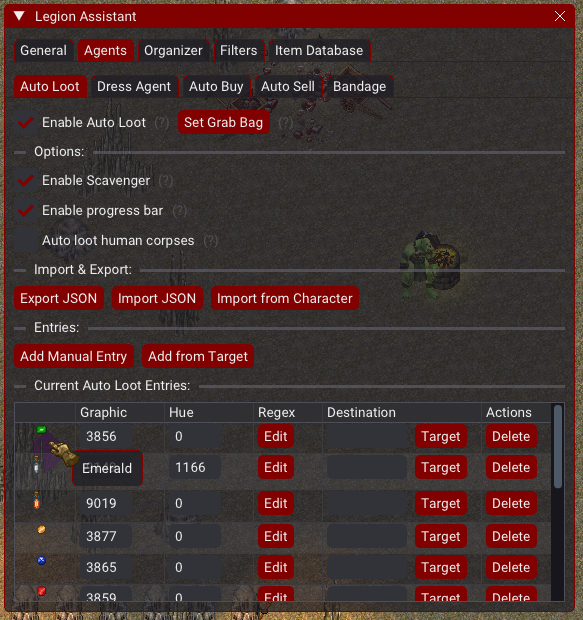
Auto loot
Auto Loot
Section titled “Auto Loot”Features:
Section titled “Features:”- Easily add items to your loot list by
Shift + Clickingthe item in a grid container. - Easy to Export/Import JSON file if desired.
- You can also use Grid Highlighting to loot items based on item properties.
Options:
Section titled “Options:”- Enable/Disable
Toggle to enable or disable autoloot - Enable Progress bar
Enables a item queue progress bar - Autoloot Human corpses
Will autoloot human corpses, warning it might not check for criminal flagging - Set Grab Bag
Target a container within your backpack to keep the autoloot or scavenger items inside - Export/Import Json
Share your config with a friend or let them do the job - Import from Character
If a existing character already has an autoloot config, you will be able to choose it - Add Entry
Manual add any item - Target Item to add
This option will prompt a target to choose an item - Max amount per entry
A "Max" column and input on each entry — the maximum number of matching items to keep in the destination container when looting that entry. It counts items already in the destination and only moves what's needed.0= no limit (loot everything). - Corpse retry delay
How long (in ms, 0-300000) to wait before retrying a recently-looted corpse. Previously a fixed 5000ms. - Disable corpse retry
Turn off retrying corpses entirely if you don't want auto loot to re-check corpses
Scavenger has moved to its own agent tab. It is no longer part of the Auto Loot agent — configure it under
Top bar -> Assistant -> Scavenger. See Scavenger.
Loot Lists
Section titled “Loot Lists”The Auto Loot agent has a Loot Lists selector so you can keep several loot configurations and quickly swap between them (e.g. one list per activity). Use New, Rename, and Delete to manage lists — at least one list is always kept. Existing auto loot entries are automatically migrated into a list named Default the first time you load this after updating.
Auto Skinning
Section titled “Auto Skinning”Auto Skinning is configured alongside Auto Loot in the Auto Loot agent tab. When a corpse is opened, TazUO automatically uses a configured knife/dagger on it (double-clicks the knife and targets the corpse) through the action queue.
- Enable Auto Skinning
Turn the feature on/off - Skin Human Corpses
Also auto skin human/humanoid corpses - Target Skinning Weapon
Target a weapon in-game to add its graphic to the knife list - Knife graphic IDs
Graphic IDs of knives/daggers used to skin corpses, separated by ';'. The first one found in your backpack is used. Accepts hex (0x0F52) or decimal.
The default knife graphic presets were removed — the knife list now starts empty, so you must add your own knife graphic(s) (via Target Skinning Weapon or by typing the IDs) before auto skinning can fire. This prevents the client from trying to use the wrong item on servers where the preset graphics don’t match a real knife.
Auto skinning responds to any target cursor type, not just the neutral cursor — so it works even on servers that send a different target cursor for the skinning knife.
Macros:
Section titled “Macros:”- Loot Hovered Item — a macro that loots whatever item your mouse is currently hovering over. It works over grid containers, regular containers, item nameplates, ground items, and the paperdoll. See Custom Macros.
- Items are looted based on
graphic(the first number) andhue(the second number). - If
hueis set to-1,huewill be ignored and onlygraphicwill be checked. - You can also optionally use regex to for matching. This is more technical and regex101 will be your friend.
Screenshot
Section titled “Screenshot”